AIStor Tables
AIStor Tables provides native support for Iceberg tables in MinIO AIStor object storage. This feature allows you to create, manage, and query Iceberg tables directly through MinIO AIStor with no dependencies on external catalog services or metadata databases.
AIStor Tables is compatible with Iceberg Golang, the Iceberg V3 spec, and the Iceberg REST Catalog. Applications can interact with Iceberg entities through the MinIO AIStor Iceberg API while performing S3 operations through the object storage API.
The following diagram provides a visual flow of how applications like Starburst, Dremio, Trino, and Spark can use either the Iceberg or S3 APIs to access distinct types of data stored in MinIO AIStor.
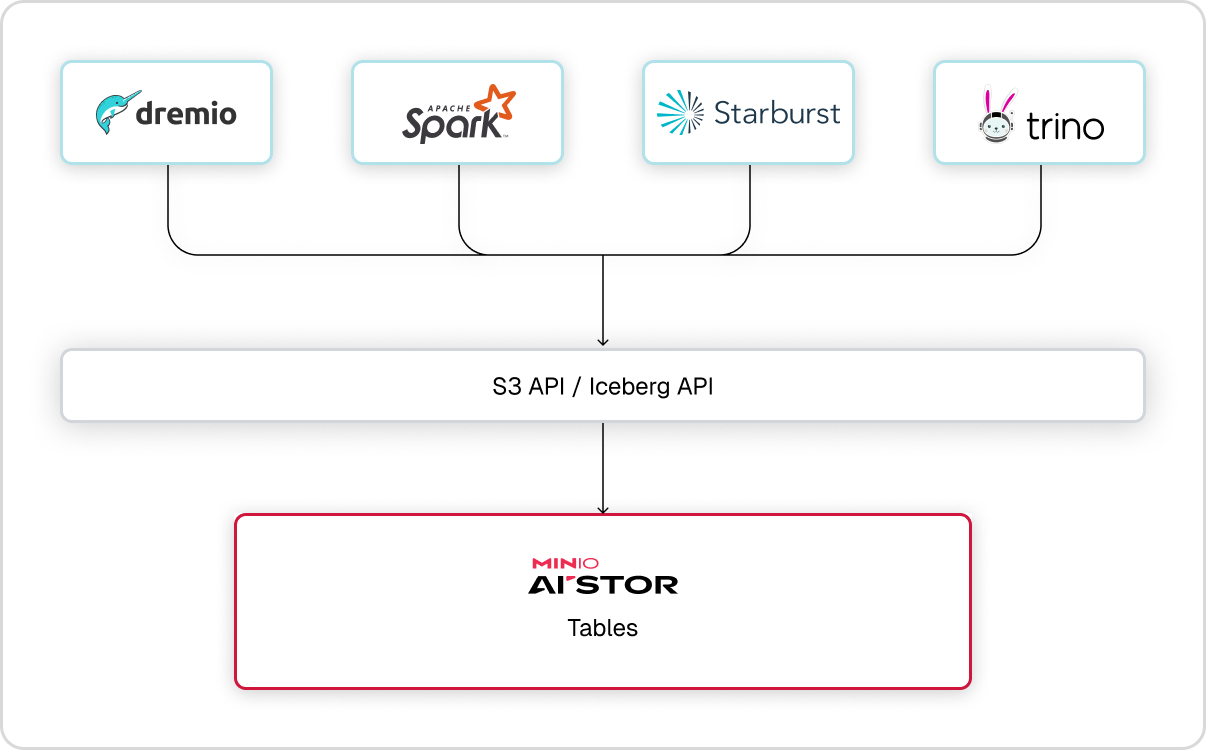
MinIO AIStor introduces support for Tables in minio RELEASE.2026-02-02T23-40-11Z and mc version RELEASE.2026-02-03T00-12-26Z.
AIStor Tables is documented in two places. This section covers running it: access control, table maintenance, Table Sharing, and site replication and disaster recovery. For building against it — the API reference, the quickstart, and connecting query engines — see the AIStor Tables developer documentation.
Create resources with AIStor Client
This example uses the AIStor Client to create new AIStor Tables resources.
minio and aistor are reserved for internal use and cannot be used as warehouse names.
aistor is the system warehouse that AIStor uses for internal metadata.
See Reserved bucket and warehouse names for details.
-
Create a warehouse named
mywarehousein the MinIO AIStor clustermyaistor:mc table warehouse create myaistor mywarehouse -
Create a namespace named
mynamespaceinside the warehouse:mc table namespace create myaistor mywarehouse mynamespace -
Create a table named
mytable:mc table create myaistor mywarehouse mynamespace mytable \ --schema '{"type":"struct","fields":[{"id":1,"name":"id","type":"long","required":true},{"id":2,"name":"name","type":"string","required":false}]}'This schema defines two columns:
Column Type Required Description idlong Yes Unique identifier namestring No Product name -
Verify the table was created:
mc table list myaistor mywarehouse mynamespace
See the AIStor Tables developer documentation for an example of inserting and querying data using Python and PyIceberg.
Encryption at rest
A warehouse can be given a default server-side encryption configuration - either SSE-S3 (AES256) or SSE-KMS (aws:kms) - which then applies to every table in the warehouse unless the table sets its own override.
Manage the warehouse default and per-table overrides with mc table encrypt.
MinIO AIStor also encrypts its internal AIStor Tables metadata at rest. The per-warehouse maintenance configuration is encrypted using the warehouse’s default encryption configuration, and each table’s maintenance job-status files are encrypted using that table’s resolved encryption configuration - a table-level override when one is set, otherwise the warehouse default.
Under site replication, the warehouse default encryption configuration replicates to peer sites so that replicas rebuild with the same encryption behavior.
Warehouse bucket versioning
Warehouse buckets use versioning with purge-on-delete to support correct replication of table deletes.
Releases after RELEASE.2026-06-06T02-44-06Z create new warehouse buckets with this configuration enabled.
MinIO AIStor enables purge-on-delete automatically whenever versioning is enabled on a warehouse bucket.
You do not need to set the --purge-on-delete flag on warehouse buckets.
On the first startup after upgrading from RELEASE.2026-06-06T02-44-06Z or earlier, MinIO AIStor runs a one-time pass that enables versioning with purge-on-delete on every existing warehouse bucket. Regular buckets are not changed.
Warehouse buckets that were previously unversioned begin retaining noncurrent object versions, which can increase storage usage.
Object lifecycle management cannot reclaim that space, because MinIO AIStor rejects bucket lifecycle configuration on warehouse buckets.
Table maintenance reclaims that storage instead.
After upgrading, review the icebergUnreferencedFileRemoval configuration of each affected warehouse.
Its --noncurrent-days setting controls how long MinIO AIStor keeps a noncurrent version before deleting it permanently.
Connect query engines to AIStor Tables
Most Apache Iceberg client libraries and query engines connect through the REST catalog endpoint using SigV4 authentication with the signing name s3tables.
Supported engines include PyIceberg, Apache Spark, Trino, Starburst, Dremio, DuckDB, and PuppyGraph.
The catalog also accepts OAuth2 bearer tokens, so an engine that cannot sign requests with SigV4, such as ClickHouse, connects with a token from the catalog’s token endpoint.
For the list of supported engines and complete, working catalog configurations for each one, including the Trino iceberg.properties template and Java truststore guidance, see Connecting query engines to AIStor Tables.
Table Sharing
MinIO AIStor’s native implementation of the DataBricks Delta Sharing Protocol supports sharing Iceberg-formatted tables with DataBricks and its ecosystem of compatible clients.
Update to at least MinIO AIStor RELEASE.2026-02-02T23-40-11Z and MinIO Client RELEASE.2026-02-19T10-32-25Z to access Delta Sharing features.
See Table Sharing for more complete documentation.