Object Locking and Immutability
MinIO AIStor Object Locking (“Object Retention”) enforces Write-Once Read-Many (WORM) immutability to protect versioned objects from deletion. MinIO AIStor supports both duration based object retention and indefinite legal hold retention.
MinIO AIStor Object Locking provides key data retention compliance and meets SEC17a-4(f), FINRA 4511(C), and CFTC 1.31(c)-(d) requirements as per Cohasset Associates.
Overview
MinIO AIStor versioning preserves the full history of object mutations. However, applications can explicitly delete specific object versions.
Applying a default 30 Day WORM lock to objects in the bucket ensures a minimum period of retention and protection for all object versions.
Delete operations follow normal behavior in versioned buckets, where MinIO AIStor creates a DeleteMarker for the object.
However, non-Delete Marker versions of the object remain under the retention rules and are protected from any specific deletion or overwrite attempts.
MinIO AIStor blocks any attempt to delete a specific object version held under WORM lock. The earliest possible time after which a client may delete the version is when the lock expires.
MinIO AIStor object locking is feature and API compatible with AWS S3. This page summarizes Object Locking / Retention concepts as implemented in MinIO AIStor. See the AWS S3 documentation on How S3 Object Lock works for additional resources.
Object Locking on Existing Buckets
Beginning with RELEASE.2025-05-20T20-30-00Z, MinIO AIStor allows setting object locking and retention rules on any existing bucket.
Earlier versions of MinIO AIStor only allowed setting retention rules for buckets that allowed object locking at the bucket’s creation.
You can enable object locking on existing buckets exclusively through the AIStor Client using the mc retention set --default option.
You can enable object locking and configure object retention rules at any time with mc retention set.
Object locking requires versioning. If you enable object locking at the time of the bucket’s creation, MinIO AIStor enables versioning automatically. To enable object locking on an existing, unversioned bucket, you must first enable versioning on the bucket.
Interaction with versioning
Objects held under WORM lock are immutable until the lock expires or is explicitly lifted. Locking is per-object version, where each version is independently immutable.
If an application performs an unversioned delete operation on a locked object, the operation produces a delete marker. Attempts to explicitly delete any WORM-locked object fail with an error. Delete Markers are not eligible for protection under WORM locking. See the S3 documentation on Managing delete markers and object lifecycles for more information.
For example, consider the following bucket with GOVERNANCE Mode locking enabled by default:
$ mc ls --versions play/locking-guide

  [DATETIME]    29B 62429eb1-9cb7-4dc5-b507-9cc23d0cc691 v3 PUT data.csv
  [DATETIME]    32B 78b3105a-02a1-4763-8054-e66add087710 v2 PUT data.csv
  [DATETIME]    23B c6b581ca-2883-41e2-9905-0a1867b535b8 v1 PUT data.csv
Attempting to perform a delete on a specific version of data.csv fails due to the object locking settings:
$ mc rm --version-id 62429eb1-9cb7-4dc5-b507-9cc23d0cc691 play/locking-guide/data.csv

  Removing `play/locking-guide/data.csv` (versionId=62429eb1-9cb7-4dc5-b507-9cc23d0cc691).
  mc: <ERROR> Failed to remove `play/locking-guide/data.csv`.
      Object, 'data.csv (Version ID=62429eb1-9cb7-4dc5-b507-9cc23d0cc691)' is
      WORM protected and cannot be overwritten
Attempting to perform an unversioned delete on data.csv succeeds and creates a new DeleteMarker for the object:
$ mc rm play/locking-guide/data.csv

  [DATETIME]     0B acce329f-ad32-46d9-8649-5fe8bf4ec6e0 v4 DEL data.csv
  [DATETIME]    29B 62429eb1-9cb7-4dc5-b507-9cc23d0cc691 v3 PUT data.csv
  [DATETIME]    32B 78b3105a-02a1-4763-8054-e66add087710 v2 PUT data.csv
  [DATETIME]    23B c6b581ca-2883-41e2-9905-0a1867b535b8 v1 PUT data.csv
Interaction with lifecycle management
MinIO AIStor object expiration respects any active object lock and retention settings for objects covered by the expiration rule.
- For expiration rules operating on only the current object version, MinIO AIStor creates a Delete Marker for the locked object.
- For expiration rules operating on non-current object versions, MinIO AIStor can only expire a non-current version after its retention period has passed and any legal hold on that version has been lifted. A legal hold blocks expiration on its own, whether or not the retention period has passed.
For example, consider the following bucket with GOVERNANCE Mode locking enabled by default for 45 days:
$ mc ls --versions play/locking-guide

  [7D]    29B 62429eb1-9cb7-4dc5-b507-9cc23d0cc691 v3 PUT data.csv
  [30D]    32B 78b3105a-02a1-4763-8054-e66add087710 v2 PUT data.csv
  [60D]    23B c6b581ca-2883-41e2-9905-0a1867b535b8 v1 PUT data.csv
Creating an expiration rule for current objects older than 7 days results in a Delete Marker for the object:
$ mc ls --versions play/locking-guide

  [0D]     0B acce329f-ad32-46d9-8649-5fe8bf4ec6e0 v4 DEL data.csv
  [7D]    29B 62429eb1-9cb7-4dc5-b507-9cc23d0cc691 v3 PUT data.csv
  [30D]    32B 78b3105a-02a1-4763-8054-e66add087710 v2 PUT data.csv
  [60D]    23B c6b581ca-2883-41e2-9905-0a1867b535b8 v1 PUT data.csv
However, an expiration rule for non-current objects older than 7 days would only take effect after the configured WORM lock expires.
Since the bucket has a 45 day GOVERNANCE retention set, only the v1 version of data.csv is unlocked and therefore eligible for deletion.
Tutorials
Create bucket with object locking enabled
You can create a bucket with object locking enabled using the Console UI, the MinIO AIStor mc CLI, or using an S3-compatible SDK.
Select the Buckets section of the Console UI to access bucket creation and management functions.
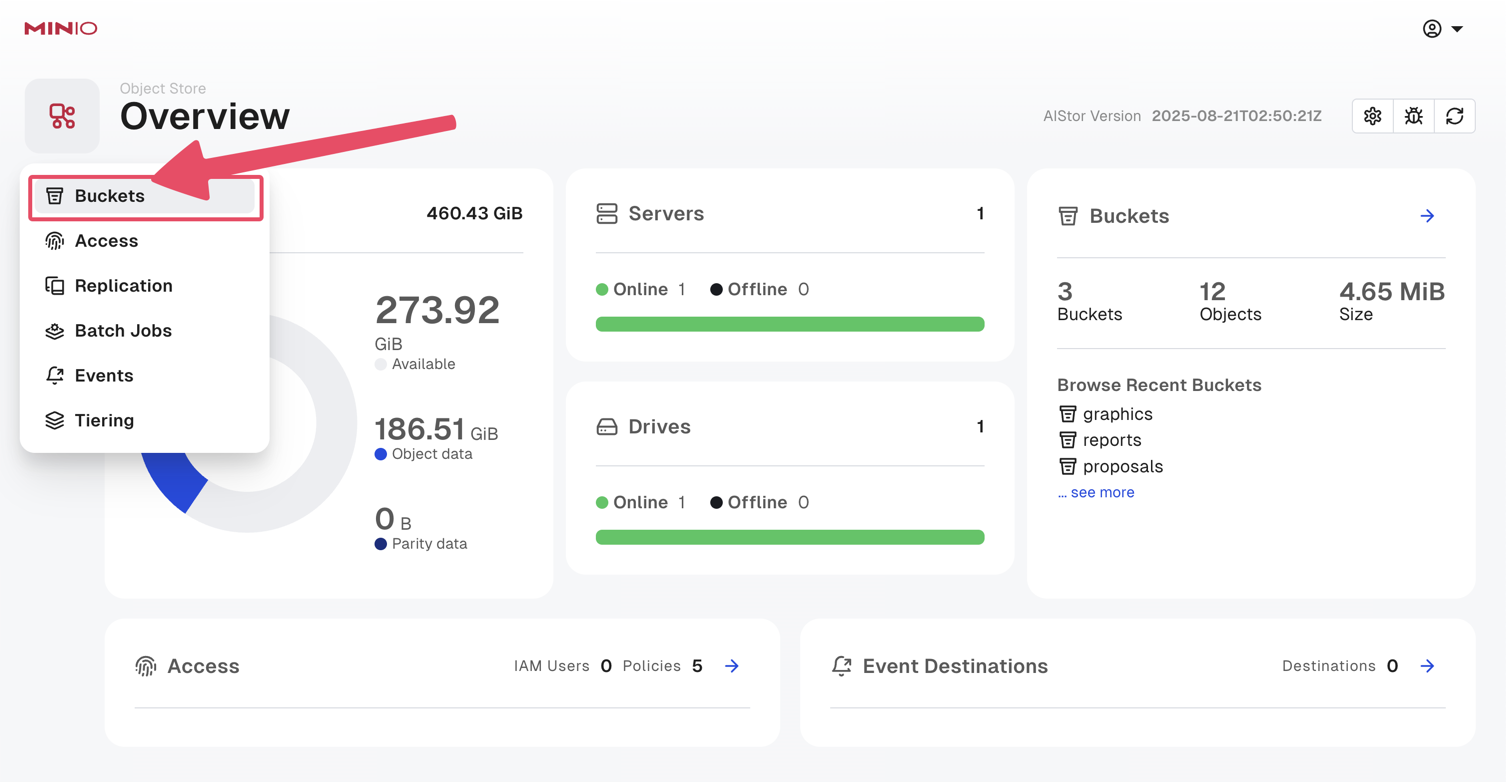
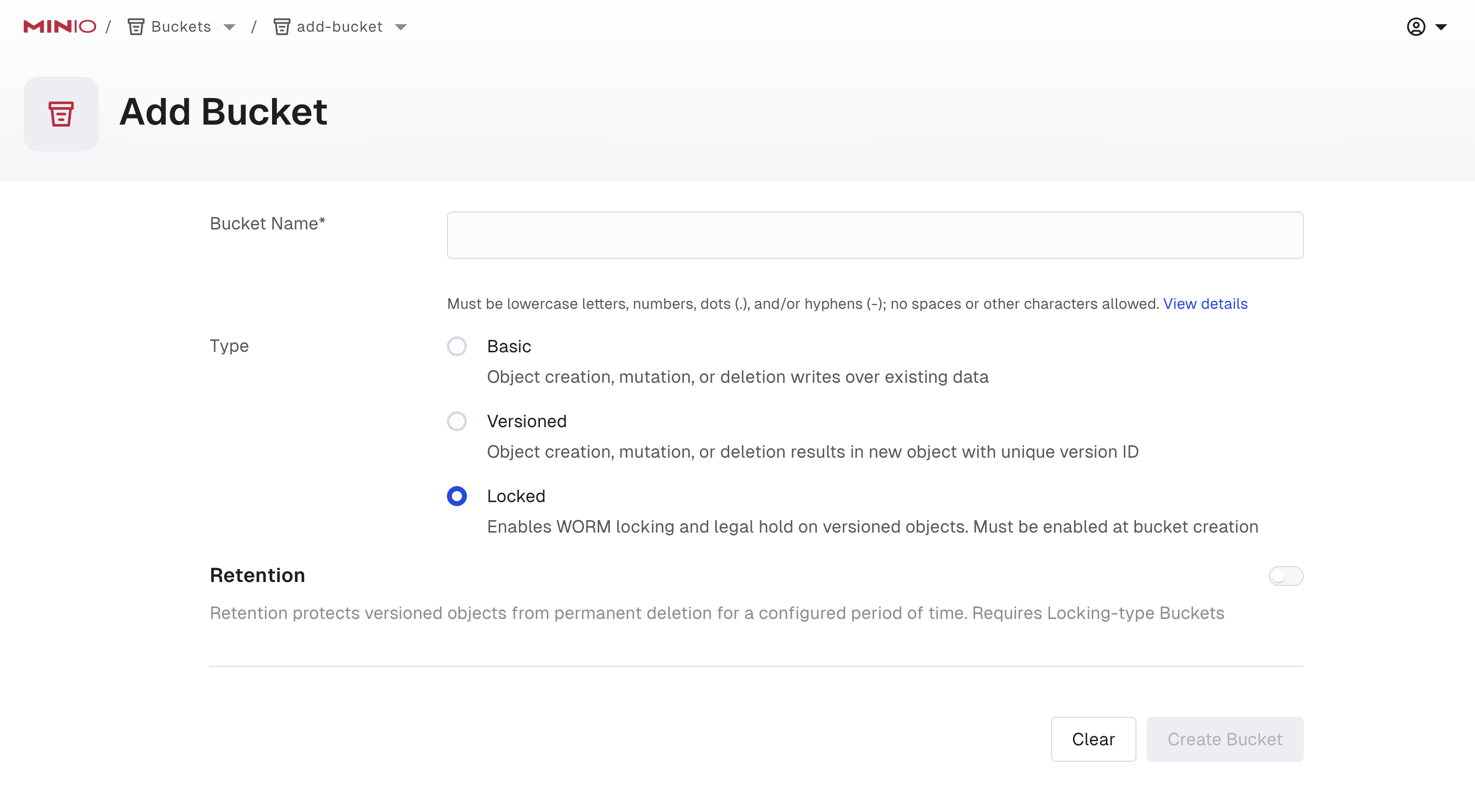
Select + Add Bucket.
Toggle the Locked selector to enable object locking on the bucket. This also enables versioning.
If desired, you can also enable Retention and define the type and duration of object lock to apply. You can manage retention rules after bucket creation as long as you create the bucket with Locked enabled.
Use the mc mb command with the --with-lock option to create a bucket with object locking enabled:
mc mb --with-lock ALIAS/BUCKETConfigure bucket-default object retention
You can configure object locking rules (“object retention”) using the Console UI, the MinIO AIStor mc CLI, or using an S3-compatible SDK.
MinIO AIStor supports setting both bucket-default and per-object retention rules.
The following examples set bucket-default retention.
For per-object retention settings, refer to the documentation for the PUT operation used by your preferred SDK.
The Console UI does not currently support adding retention rules on existing buckets that did not add them at the time of creation. Use the AIStor Client to enable retention or locking on existing buckets.
-
Select the Buckets section of the Console UI to access bucket creation and management functions.
-
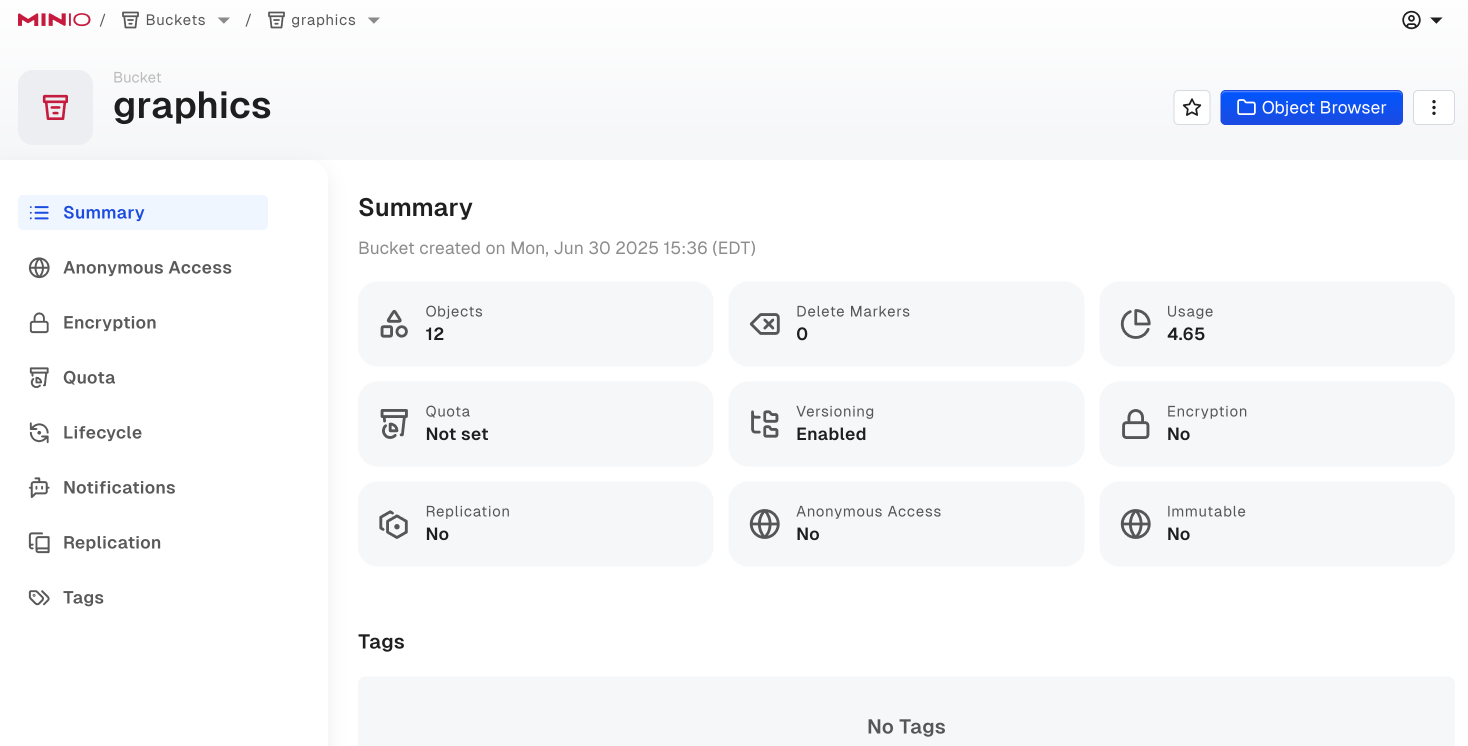
Select the bucket to manage from the list to view the management options for that bucket.
-
Select the vertical dot menu, then Edit Bucket.
-
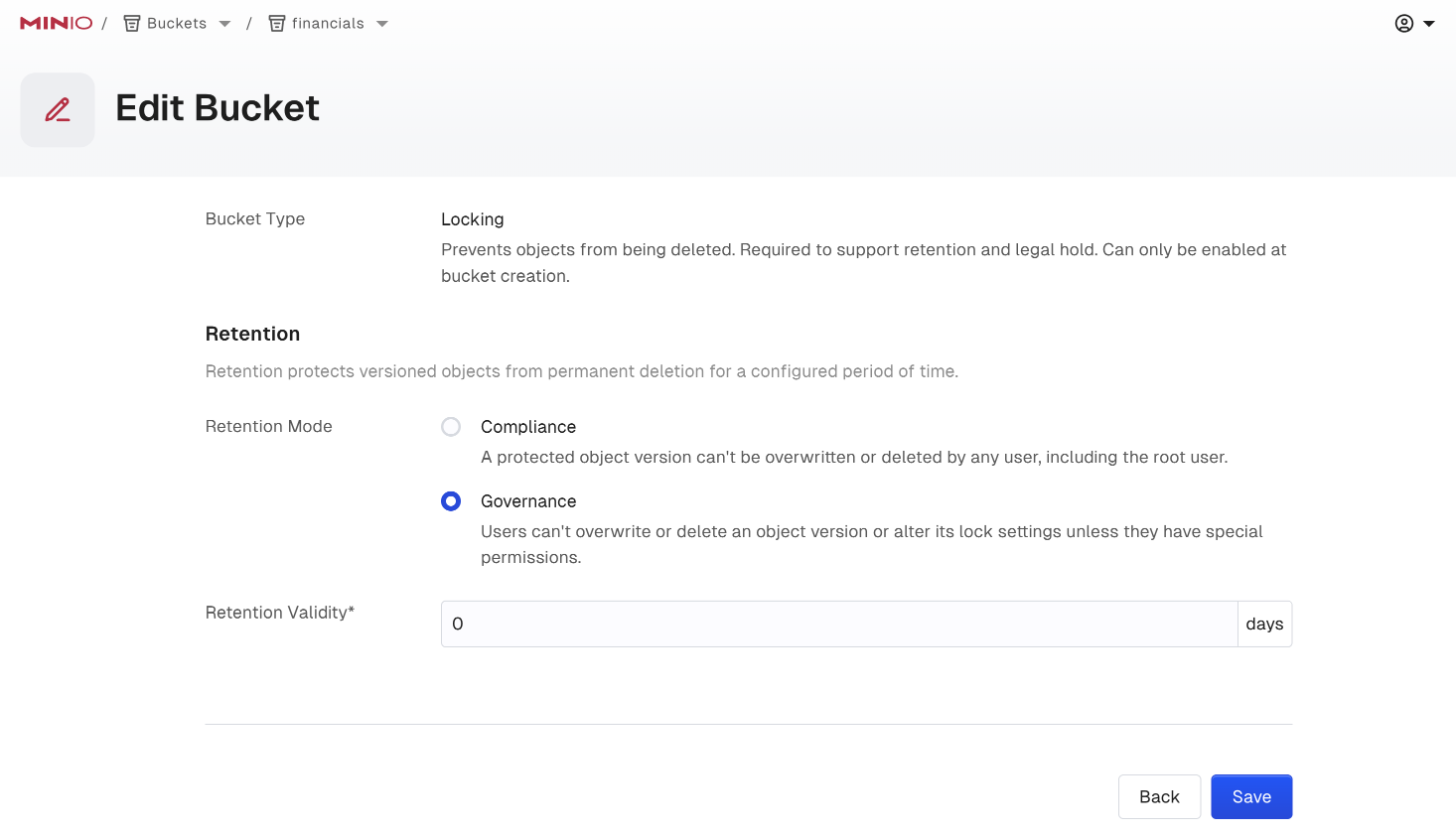
From the Retention section, select the type of retention mode to use and the duration of the lock. This section is only visible for buckets created with object locking enabled.
- For Retention Mode, select either COMPLIANCE or GOVERNANCE.
- For Retention Validity, set the duration of time for which MinIO AIStor holds objects under the specified retention mode for the bucket. The time duration can be set as either days or years.
Use the mc retention set command with the --recursive and --default options to set the default retention mode for a bucket:
mc retention set --recursive --default MODE DURATION ALIAS/BUCKET- Replace
MODEwith either COMPLIANCE or GOVERNANCE. - Replace
DURATIONwith the duration for which the object lock remains in effect. - Replace
ALIASwith thealiasof a configured MinIO AIStor deployment. - Replace
BUCKETwith the name of the bucket on which to set the default retention rule.
Enable legal hold retention
You can enable or disable indefinite legal hold retention for an object using the Console UI, the MinIO AIStor mc CLI, or using an S3-compatible SDK.
You can place a legal hold on an object already held under a COMPLIANCE or GOVERNANCE lock. The object remains WORM locked under the legal hold even when the retention lock expires. You or another user with the necessary permissions must explicitly lift the legal hold to remove the WORM lock.
Modifying legal hold status in the Console requires that the bucket have retention defined at the time of the bucket creation. To modify legal hold status on objects in existing buckets, use the AIStor Client CLI instead.
-
Select the Buckets section of the Console UI to access bucket creation and management functions.
-
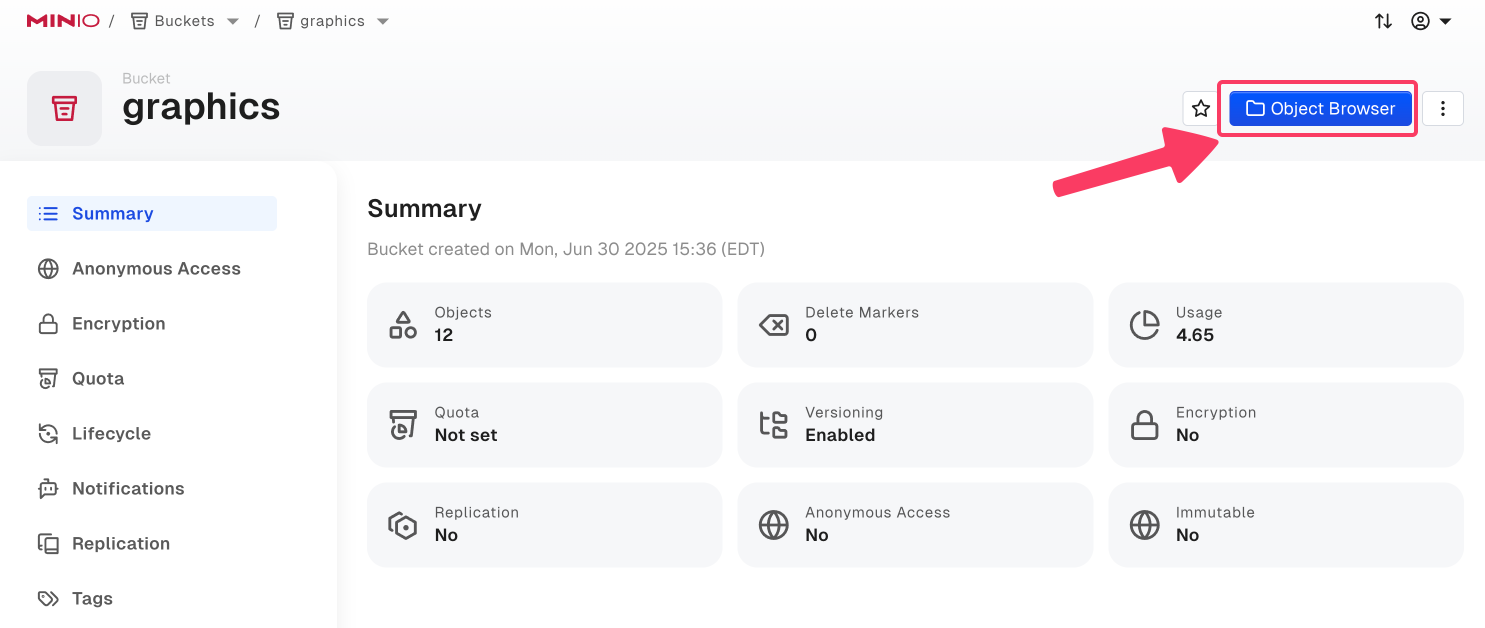
Select the bucket with the object to manage to opens the management view of the object. You can use the Search bar to filter the list.
The selected bucket must have been created with locking enabled to modify retention rules from the Console UI.
-
Select Object Browser.
-
Browse to the object and select it to open the object details view. Use the Find Object search bar to filter objects.
-
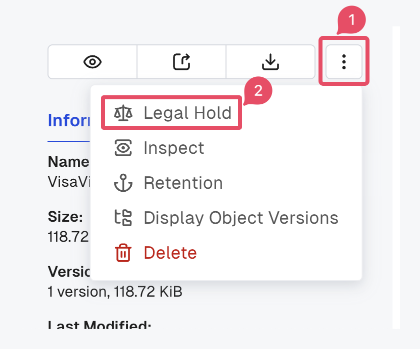
From the object details, select the vertical dot menu, then select Legal Hold to manage the legal hold status of the object.
-
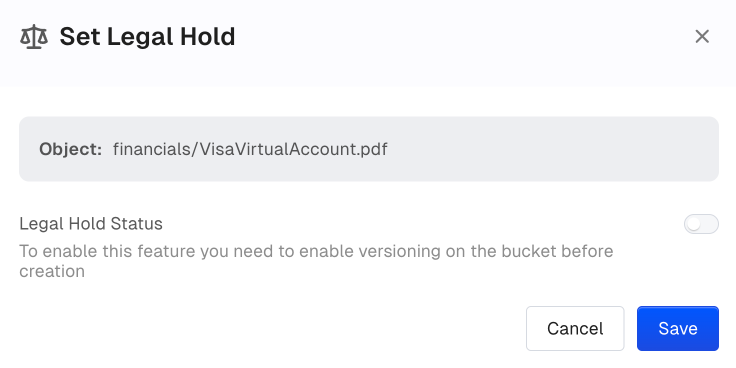
Toggle the Legal Hold Status option to enable or disable the legal hold on the object.
Use the mc legalhold set command to toggle the legal hold status on an object.
mc legalhold set ALIAS/PATHObject retention modes
MinIO AIStor implements the following S3 Object Locking Modes:
| Mode | Summary |
|---|---|
| GOVERNANCE Mode | Prevents any operation that would mutate or modify the object or its locking settings by non-privileged users. Users with the s3:BypassGovernanceRetention permission on the bucket or object can modify the object or its locking settings.MinIO AIStor lifts the lock automatically after the configured retention rule duration has passed. |
| COMPLIANCE Mode | Prevents any operation that would mutate or modify the object or its locking settings. No MinIO AIStor user can modify the object or its settings, including the MinIO AIStor root user. MinIO AIStor lifts the lock automatically after the configured retention rule duration has passed. |
Time source for retention dates
By default, MinIO AIStor computes object-lock retention dates from the server’s system clock.
To use a remote NTP server as the time source instead of system time, set the MINIO_NTP_SERVER environment variable to the NTP server endpoint.
GOVERNANCE mode
An object under GOVERNANCE lock is protected from write operations by non-privileged users.
GOVERNANCE locked objects enforce managed-immutability for locked objects, where users with the s3:BypassGovernanceRetention action can modify the locked object, change the retention duration, or lift the lock entirely.
Bypassing GOVERNANCE retention also requires setting the x-amz-bypass-governance-retention:true header as part of the request.
Changing the retention of a locked object requires both s3:BypassGovernanceRetention and s3:PutObjectRetention.
Earlier releases accepted either permission on its own, so review any policy that grants only one of the two.
The MinIO AIStor GOVERNANCE lock is functionally identical to the S3 GOVERNANCE mode.
COMPLIANCE mode
An object under COMPLIANCE lock is protected from write operations by all users, including the MinIO AIStor root user.
COMPLIANCE locked objects enforce complete immutability for locked objects.
You cannot change or remove the lock before the configured retention duration has passed.
The MinIO AIStor COMPLIANCE lock is functionally identical to the S3 COMPLIANCE mode.
Legal hold
An object under legal hold is protected from write operations by all users, including the MinIO AIStor root user.
Legal holds are indefinite and enforce complete immutability for locked objects.
Only privileged users with the s3:PutObjectLegalHold permission can set or lift the legal hold.
Legal holds apply at the object level. If you enable legal hold for a group of objects, such as the contents of a bucket, subsequently created objects in that bucket are not affected.
Legal holds are complementary to both GOVERNANCE Mode and COMPLIANCE Mode retention settings.
An object held under both legal hold and a GOVERNANCE/COMPLIANCE retention rule remains WORM locked until the legal hold is lifted and the rule expires.
For GOVERNANCE locked objects, the legal hold prevents mutating the object even if the user has the necessary privileges to bypass retention.