Enable Object Versioning
You can enable versioning using one of the following:
- At bucket creation
- Console UI (WebUI)
- MinIO AIStor Client CLI
Developers can also enable versioning on buckets through an S3-compatible SDK
Enable versioning at bucket creation
When creating a bucket in the Console, select either Versioned as the bucket Type.
You can choose to disable versioning for objects that exist only as folder organization. You can also add one or more prefixes to ignore for versioning.
If you select Locked as the bucket Type, this also enables versioning. Versioning is required to enable WORM locking.
Use the mc mb command with the --with-versioning flag to enable versioning on the bucket.
mc mb ALIAS/bucket --with-versioningReplace ALIAS with the alias of the deployment.
Enable versioning on an existing bucket
You can enable versioning on a bucket that already has objects.
Objects created prior to enabling versioning have a null version ID.
-
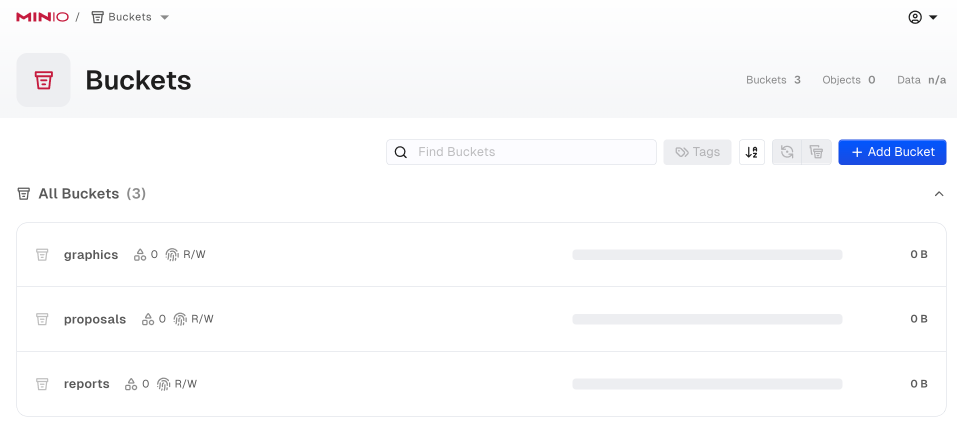
Select the Buckets section of the Console UI to access bucket creation and management functions.
-
Select the bucket to modify.
-
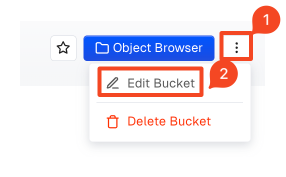
Select the vertical dot stack button, then Edit Bucket.
-
Toggle the Versioning radio button to enable versioning on the bucket.
You must have already installed the AIStor Client and defined an alias for the deployment.
Use the mc version enable command to enable versioning on an existing bucket:
mc version enable ALIAS/BUCKET- Replace
ALIASwith thealiasof a configured MinIO AIStor deployment. - Replace
BUCKETwith thetarget bucketon which to enable versioning.