License Configuration for Previous Versions
This page provides license configuration instructions for the following legacy MinIO KMS versions:
- Binary (Linux) installations on MinIO KMS releases prior to
RELEASE.2025-11-12T19-14-51Z. - Kubernetes installations using the
minkms-operatorHelm chart prior to version 1.5.0. - OpenShift installations using the MinIO KMS Operator prior to version
2026.4.13102716.
MinIO KMS no longer requires a MinIO Commercial License to operate as of:
- MinIO KMS binary release
RELEASE.2025-11-12T19-14-51Zfor Linux installations. minkms-operatorHelm chart version 1.5.0 for Kubernetes installations.- MinIO KMS Operator version
2026.4.13102716for OpenShift installations.
This guide is only for users who need to install or maintain older versions of MinIO KMS.
For new installations, use the current installation guides which do not require license configuration.
Download your MinIO Commercial License
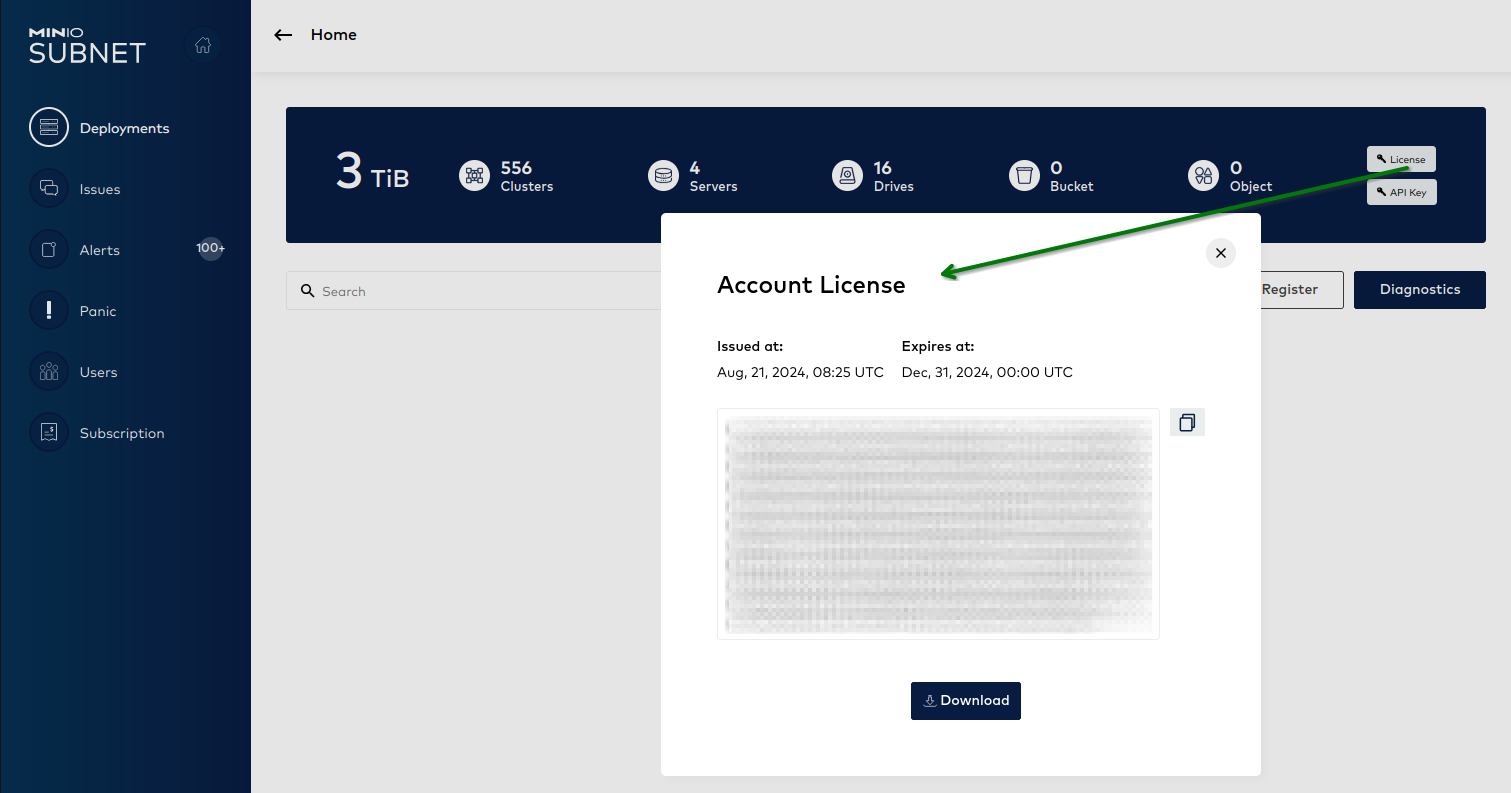
Use the following steps to download your license:
-
Log into MinIO SUBNET.
-
Navigate to the Deployments view.
-
Select the License button to view and download your license key.
-
Save the license file or copy the license string to a secure location.
If you do not have access to SUBNET, contact us at hello@min.io or see our pricing page for licensing information.
License configuration by platform
Select the tab for your deployment platform:
-
Install the Operator with license.
Install the Operator chart with the values file:
helm install minkms-operator minio/minkms-operator \ -n minkms-operator --create-namespace \ -f minkms-operator-values.yaml \ --set license="eyJhbGciOiJFUzM4NCIsInR..." -
Proceed with MinIO KMS installation.
After the operator is installed with the license, proceed with installing the MinIO KMS using the
minkmschart as documented in the Kubernetes installation guide.
-
Save the license file.
Save the license file to a secure location on your MinIO KMS host, such as
/etc/minkms/minio.license, update its owner, and change the permissions.# Example: Save license to /etc/minkms/minio.license # Ensure proper ownership and permissions chown minkms-user:minkms-user /etc/minkms/minio.license chmod 600 /etc/minkms/minio.license -
Configure the environment variable.
Add the
MINIO_LICENSEenvironment variable to your MinIO KMS environment file:MINIO_LICENSE=/etc/minkms/minio.licenseIf you cannot set the environment variable, provide the license path directly to the
minkms servercommand:minkms server /path/to/data --license /etc/minkms/minio.license
-
Create a license secret.
Create a Kubernetes secret containing your base64-encoded license:
# First, base64 encode your license echo -n "YOUR-LICENSE-STRING" | base64 # Create license.yaml apiVersion: v1 data: minio.license: <base64-encoded-license-here> kind: Secret metadata: name: minio-license type: Opaque -
Apply the license secret.
Apply the secret to the
minkms-operatornamespace:oc apply -f license.yaml -n minkms-operator -
Proceed with the Operator installation.
After creating the license secret, proceed with the operator installation as documented in the OpenShift installation guide.
Upgrading to license-free version
If you are currently running a version that requires a license and wish to upgrade to a license-free version (binary release RELEASE.2025-11-12T19-14-51Z or later, minkms-operator Helm chart 1.5.0 or later, or MinIO KMS Operator 2026.4.13102716 or later on OpenShift):
- Follow the standard upgrade procedures for your platform.
- After upgrading, you can optionally remove:
- The
MINIO_LICENSEenvironment variable from your configuration. - The
minio.licensefile from your system. - License secrets from Kubernetes/OpenShift namespaces.
- The
--licenseflag from systemd service files or startup scripts.
- The
The new version will continue to function if these configurations remain in place but will ignore them.
Troubleshooting
If you encounter license-related errors with previous versions:
- Verify the license file path is correct and the file is readable by the MinIO KMS process.
- Ensure the license string is correctly formatted (no extra whitespace or line breaks).
- Check that the license has not expired by logging into SUBNET.
- Verify the MinIO KMS process user has permission to read the license file.
- For Kubernetes/OpenShift, ensure the license secret exists in the correct namespace.
For additional assistance, contact hello@min.io.