Distributed benchmarking
Distributed benchmarking uses multiple Warp client instances to aggregate load from multiple machines. This allows Warp to generate higher loads than a single machine can produce.
Architecture
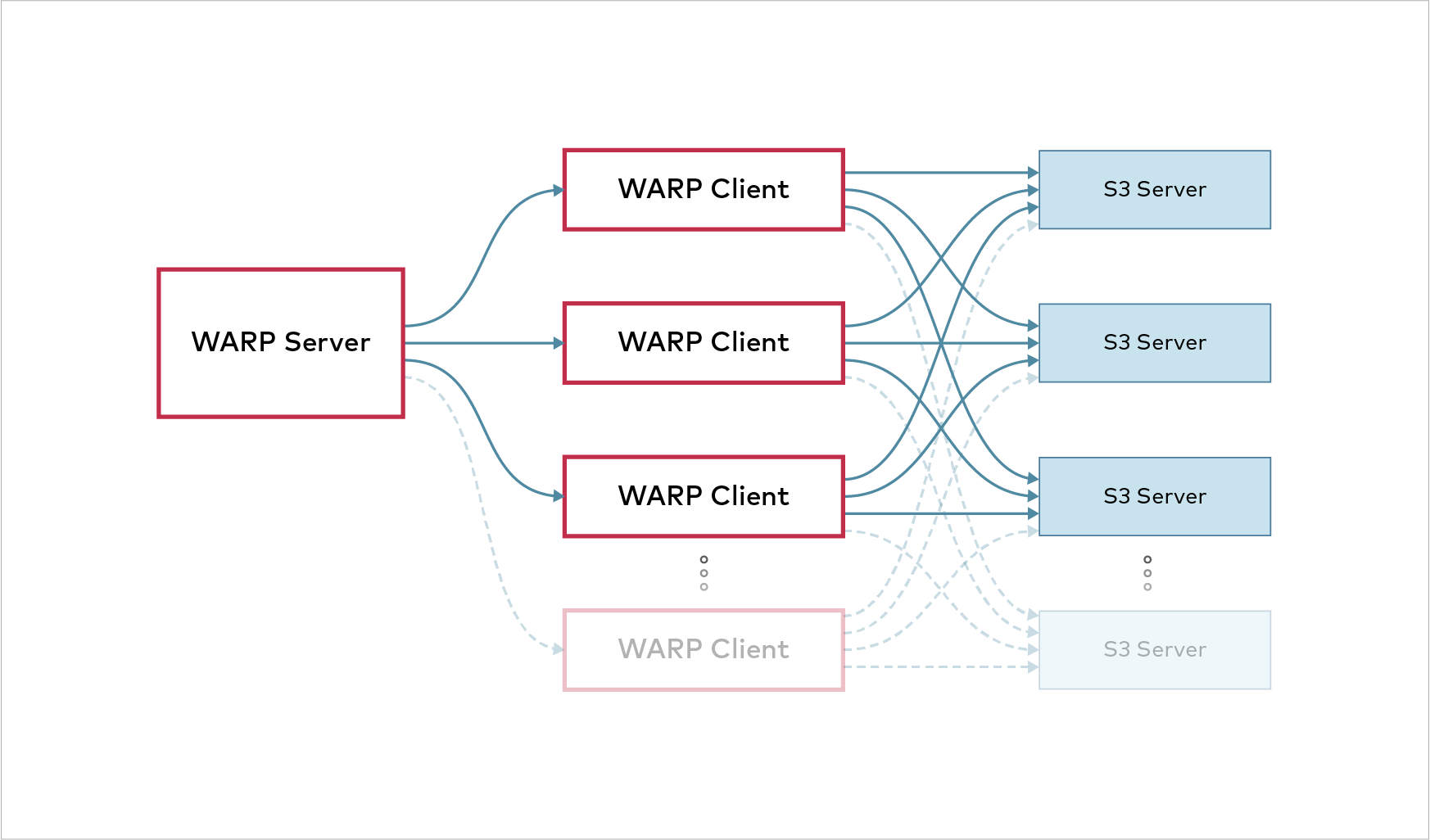
Distributed benchmarking uses a coordinator-client architecture where a single coordinator client synchronizes results from multiple client instances.
-
Start Warp on each client.
When you start a client, it opens a WebSocket server that listens for connections from a coordinator.
-
Start Warp in coordinator mode on the aggregating machine.
The coordinator sends test instructions to all connected clients.
-
Each client runs the Warp tests against the target S3 endpoints.
-
All clients report their individual results back to the coordinator. The coordinator aggregates results from all clients into a single comprehensive report.
Setup and deployment
Basic setup
Deploy client instances before running tests from the coordinator.
Start a client on each machine designated for load generation:
warp clientThe client listens on the default port 7761 and accepts connections from any network interface.
Run a test from the coordinator machine using the --warp-client flag:
warp mixed --warp-client client{1...4}:7761 --access-key YOUR_ACCESS_KEY --secret-key YOUR_SECRET_KEYSpecify the port the warp clients listen on.
The example above uses the default port.
The coordinator connects to each specified client and sends it the test parameters. All clients execute the same test parameters simultaneously. The coordinator collects and merges results from all clients into a single report.
A warp client listens on every network interface on port 7761 by default, and it does not authenticate the connections it accepts.
Give the client an explicit address so it binds a single interface, and allow port 7761 only from the coordinator:
warp client 203.0.113.5:7761Network requirements
Clients must be reachable from the coordinator machine over the network. The listen port must be accessible through any firewalls between the coordinator and clients.
Firewall Configuration
The default port 7761 must be open for bidirectional TCP communication between coordinator and clients. Configure firewalls to allow incoming connections on the client listen port. WebSocket connections require persistent TCP connectivity throughout the test duration.
All clients need network access to the S3 endpoints being tested. Clients perform their own S3 operations directly without proxying through the coordinator. Ensure all clients can reach the S3 endpoint on the configured port (typically 9000 or 443).
Test network connectivity before running tests:
# Test client reachability from coordinator
telnet client1 7761

# Test S3 endpoint reachability from each client
telnet s3.example.com 9000
Deployment strategies
Bare metal deployment
For production-scale testing, deploy clients as persistent services. Use systemd on Linux systems to manage client instances.
Create a systemd service file at /etc/systemd/system/warp-client.service:
[Unit]
Description=Warp Benchmark Client
After=network.target

[Service]
Type=simple
ExecStart=/usr/local/bin/warp client 203.0.113.5:7761
Restart=always
User=warp
Group=warp

[Install]
WantedBy=multi-user.target
Replace 203.0.113.5 with the address of the interface the coordinator connects to.
Enable and start the service:
systemctl enable warp-client
systemctl start warp-client
Verify the service status:
systemctl status warp-clientClient management
Resource allocation
Each client should run on a separate physical or virtual machine. Running multiple clients on the same machine does not increase load generation capacity.
Distribute clients across different network segments to simulate realistic traffic patterns.
Clients consume CPU and memory resources proportional to the test concurrency level. Provision client machines with sufficient resources to handle the target test load.
Monitor client resource usage during tests:
# Monitor CPU and memory on Linux
top

# Monitor network throughput
iftop
Scaling considerations
Add more client instances when you need to generate higher aggregate loads.
Calculate required client count based on these factors:
- Single-client network bandwidth capacity
- Single-client CPU capacity (affects encryption and compression operations)
- Target storage system capacity (add clients until storage system saturates)
- Network architecture (distribute across network segments)
Start with fewer clients and add more as needed while monitoring storage system utilization.
Connection stability
Maintain persistent connections between coordinator and clients throughout the test duration.
Network interruptions cause test failures. Use reliable networks with low packet loss and avoid wireless connections for production testing.
Client connections timeout after periods of inactivity. The coordinator maintains connections through periodic communication during test execution.
Monitor connection status using the --debug flag:
warp client --debugThis displays detailed information about coordinator connections and test operations.
Running distributed tests
Basic usage
Start client instances on each machine:
# On machine 1
warp client 192.168.1.101:7761

# On machine 2
warp client 192.168.1.102:7761

# On machine 3
warp client 192.168.1.103:7761
Run the benchmark from the coordinator:
warp get --host s3.example.com:9000 \
  --access-key ACCESS_KEY \
  --secret-key SECRET_KEY \
  --warp-client 192.168.1.10{1...3}:7761 \
  --concurrent 100
The coordinator sends the same test parameters to all three clients. Each client executes the GET benchmark with 100 concurrent operations, which is 300 concurrent operations in total. The coordinator aggregates results from all clients into a single report.
Workload distribution
The coordinator sends the same benchmark parameters to every connected client, including the concurrency level, object sizes, and duration. Each parameter applies to each client rather than to the run as a whole, so adding clients multiplies the load instead of dividing it. All clients execute operations simultaneously against the target S3 endpoints.
For example, with three clients and --concurrent 100, each client runs 100 concurrent operations.
The aggregate concurrency across all clients totals 300.
Result aggregation
The coordinator collects operation-level data from all clients during benchmark execution.
Results include operations per second, throughput, and latency percentiles aggregated across all clients. The final report shows total performance across the entire distributed system.
Individual client results are not displayed separately in the default output.
Use the --benchdata flag to save detailed per-client operation data for subsequent analysis.
Add the --json flag on the coordinator to print the aggregated final result as indented JSON instead of the human-readable report.
JSON output also turns off the live progress display.
The coordinator writes the compressed benchmark data file either way, so --json changes only what the coordinator prints.
Troubleshooting
Common issues and resolutions:
| Issue | Possible cause | Resolution |
|---|---|---|
| Coordinator cannot connect to clients | Firewall blocking port 7761 | Verify firewall rules allow TCP connections on the client listen port |
| Client connection timeouts | Network instability | Use wired connections and verify network reliability |
| Inconsistent results across runs | Client resource exhaustion | Monitor client CPU and memory, add more clients or reduce concurrency |
| Low aggregate throughput | Storage system bottleneck | Verify storage system can handle target load, check for configuration issues |
Enable debug output on both coordinator and clients for detailed troubleshooting:
# On clients
warp client --debug

# On coordinator
warp mixed --warp-client client1:7761,client2:7761 --debug --access-key YOUR_ACCESS_KEY --secret-key YOUR_SECRET_KEY